From $40 to $0.80: rethinking the sales-to-delivery handover with AI agents
How Rapid Circle is using agent-based thinking to connect the work we win with the customer experiences we want to deliver.

By the time a project reaches delivery, we already know a great deal about what the customer needs. The challenge is carrying that understanding into the team that will do the work. Scope, effort, timing and responsibilities are captured during sales, spread across conversations, systems and documents. Bringing them together gives delivery a clearer starting point and helps the customer experience continuity as the team around them changes.
At Rapid Circle, we now have a production workflow using AI agents to help prepare that handover. It gathers the evidence, reconciles the detail and prepares recommendations for our people to assess. Our systems can also recommend people for the work, but ultimately a human chooses the best person for the job, considering their skills, the team composition and the customer. The workflow helps them reach those decisions with the context already assembled.
The work hiding between the systems
The information needed for a handover already exists, but it takes work to bring it together. Dynamics holds opportunity information, while SharePoint contains statements of work and effort workbooks. Let's be honest, though: every organisation is a bit scrappy around the edges, despite the best intentions. We're no exception. There is occasionally a little "do as we say, not as we do" in the filing department.
A folder might use a customer abbreviation that was obvious to the person who created it. A responsibility might imply a specialist skill without naming it, or two documents might describe the same effort in different units. Someone usually knows what it all means, but they are not always the person preparing the handover. That is the reality the workflow needs to work with, and reconstructing that context takes time.
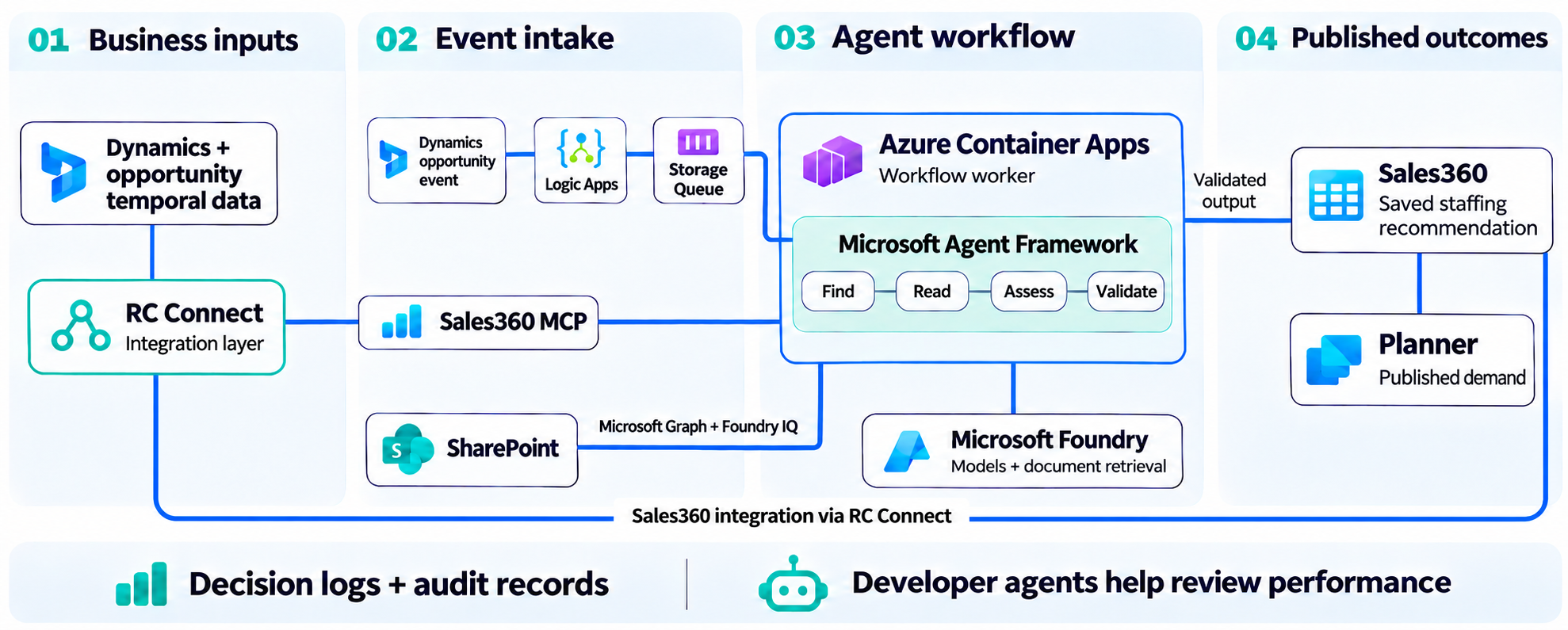
RC Connect provides our integration layer into Dynamics and opportunity temporal data: information about the opportunity over time. Our Sales360 application connects to Dynamics through RC Connect. Sales360 MCP, the Model Context Protocol interface for agents, also uses RC Connect. The Agent Framework workflow always uses Sales360 MCP to retrieve opportunity information.
The diagram below shows how those pieces connect. Azure handles event intake and execution, while Microsoft Agent Framework coordinates the agents and application code. The workflow prepares a staffing recommendation, which is checked and saved in Sales360 before demand is published into Planner.
Keep the shape of the work
Consider a fictional four-week project. The statement of work allows ten person-days for a delivery consultant, while the effort workbook describes the assignment like this:
- Week 1: 16 hours
- Week 2: 40 hours
- Week 3: 0 hours
- Week 4: 24 hours
- Total: 80 hours
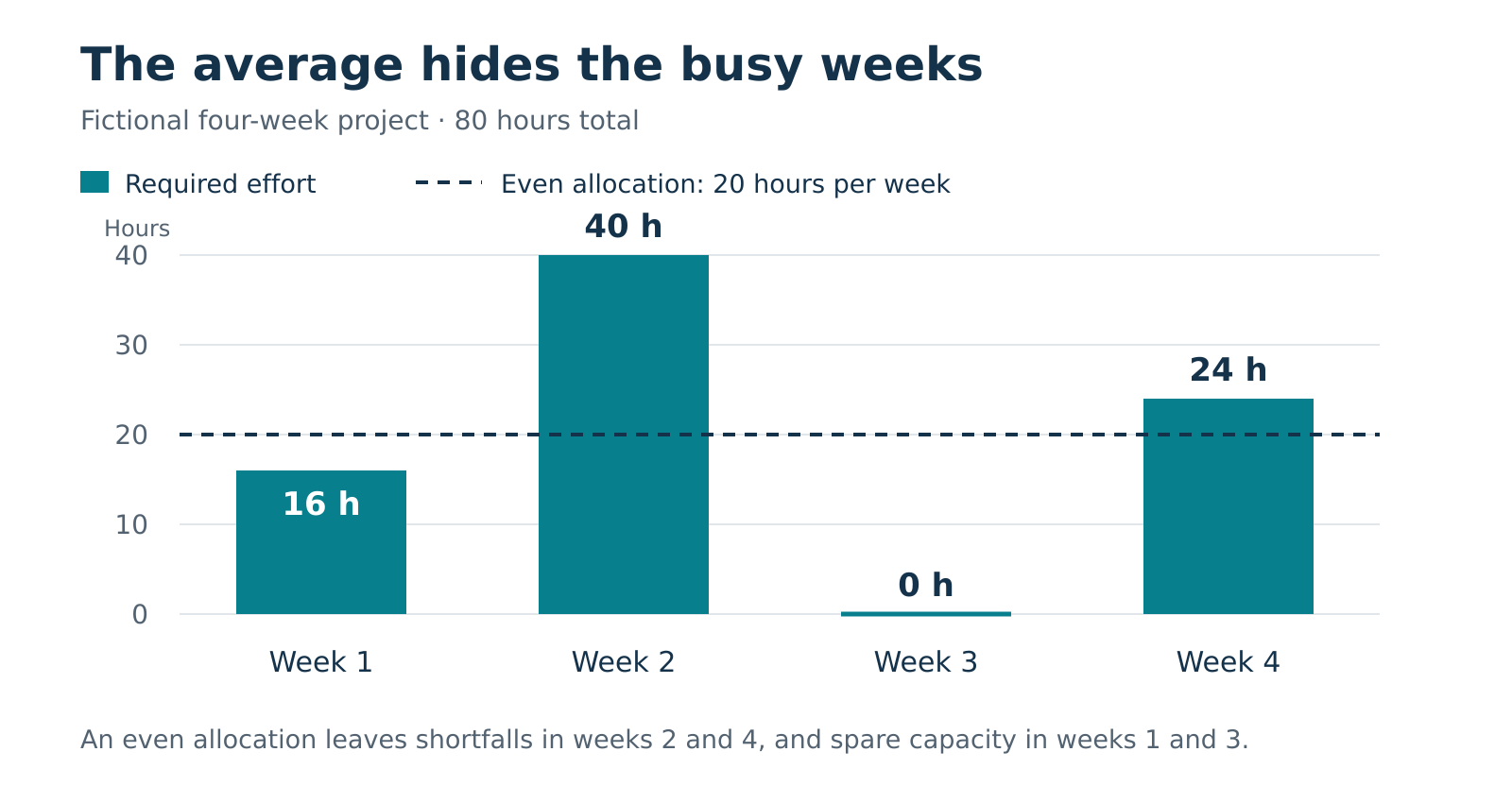
Using an eight-hour working day, the sources agree. Across four 40-hour weeks, the assignment averages 0.5 FTE, or half of one person's full-time capacity. It looks tidy on the dashboard, which is small comfort to the person trying to staff week two. Book someone for half of every week and the plan will have too little capacity in week two, unnecessary capacity in week three and a shortfall again in week four. The total is correct, but the average has hidden the pattern that matters to delivery.
The staffing assessment preserves that pattern. It reconciles the ten person-days with the 80 hours and retains the weekly profile alongside the role, dates and supporting evidence. The delivery lead can see both how much work is needed and when it needs to happen, with the arithmetic and source reconciliation already prepared.
Give the agents a route to follow
One lesson we have learned is that giving one agent too much to do dilutes how well it performs overall. Finding documents, interpreting scope, calculating effort and updating planning systems each require a different focus. Combining them gives one agent more instructions, tools and competing responsibilities to manage. It turns out "and while you're there..." is no better as an agent design strategy than it is as a project brief. It also makes a poor recommendation harder to investigate because the problem could have started anywhere in that chain.
We give each stage a clear job. First, establish the opportunity context. Then find the relevant documents, read the statement of work and workbook in parallel, and bring their findings together for staffing assessment. Microsoft Graph supports document discovery, Foundry IQ retrieves document evidence, and Microsoft Agent Framework coordinates the sequence. Each agent receives focused inputs and produces findings the next stage can use.
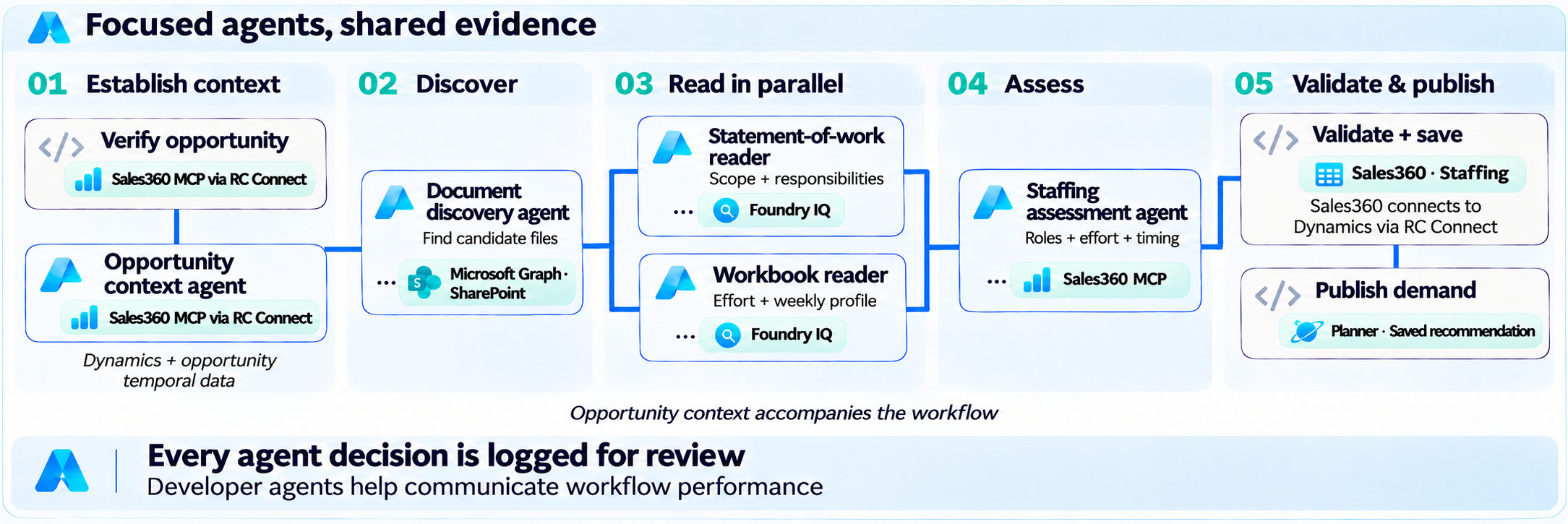
Those boundaries make improvement more targeted. If the wrong workbook was selected, we can examine discovery. If the weekly effort was misunderstood, we can examine reading and assessment. We have a clearer place to investigate and improve, without continually expanding one agent's instructions to cover every possible problem.
Make the checks and decisions visible
Agents interpret the information; application code applies repeatable checks to the result. Effort allocations must add up, dates must be consistent, and required scheduling detail must be present before demand can be published. Planner receives the recommendation saved in Sales360, preserving the evidence and calculations already established. These checks catch structural problems, but a recommendation can still be internally consistent and misunderstand the customer. Source references and supporting explanations remain available for review.
We also log every decision made by the workflow agents. "The agent said so" is unlikely to satisfy a delivery lead asking why a particular role was recommended. We need to be able to follow the evidence, and that matters when the workflow stops as much as when it succeeds. If there is genuinely no applicable workbook, sufficient statement-of-work evidence may support a qualified recommendation. If a workbook exists but cannot be retrieved, staffing assessment stops: there is evidence we have not inspected. Recording those decisions helps us understand why the workflow continued or paused, rather than treating every empty result as the same problem.
The agents our developers use provide another layer of observability, helping review that recorded activity and communicate how the workflow agents are performing. Together, the decision logs, source references and publication outcomes make it easier to understand a run, identify where it needs attention and improve the process. That visibility is part of operating the workflow in production.
The cost of getting ready
For illustration, assume thirty minutes of manual preparation at a fully loaded staff cost of A$80 per hour. That represents A$40 of staff capacity, compared with an estimated model-token cost of approximately A$0.80 per opportunity. The rest of the application costs around A$100 per month to run and supports much more than this handover workflow, so the share attributable to each opportunity is small and depends on volume. Human review, development and maintenance still involve effort; the comparison shows the economics of preparing the handover.
Across 100 opportunities, those assumptions represent 50 hours of manual preparation, or A$4,000 of staff capacity, alongside approximately A$80 in model processing and a share of the operating costs. The time actually recovered depends on the review and exceptions each opportunity needs. For our people, that can mean more time supporting colleagues, considering the right team or understanding the engagement. For the customer, it can mean a smoother start, with fewer details needing to be reconstructed after the work changes hands.
A better beginning for delivery
A clearer view of roles, effort and timing also helps us see where delivery demand is building across opportunities. It gives us more time to prepare and develop the capabilities we will need. Our people are dynamic, with strengths and experience that extend beyond a role label. Systems can recommend suitable people, while a human decides who will do the job best and how the team should come together.
For the delivery lead preparing that four-week project, the starting point is better: the scope has been gathered, the effort reconciled, the weekly pattern preserved and the evidence made available. Carrying that understanding from sales into delivery gives our people more time to act on it and helps the customer experience the continuity they expect.